
Agent
Agent configuration for Crow CI workers.
Minimum Configuration
Section titled “Minimum Configuration”| Variable | Description |
|---|---|
CROW_SERVER | Server gRPC address (no protocol prefix) |
CROW_AGENT_SECRET | Authentication token from server |
Parallel Workflows
Section titled “Parallel Workflows”By default, agents execute one workflow at a time. Increase based on available resources.
When several agents share a machine, a host file caps what they run together.
Single-Use Agents
Section titled “Single-Use Agents”CROW_MAX_WORKFLOWS caps how many workflows an agent runs at once.
CROW_AGENT_MAX_LIFETIME_WORKFLOWS caps how many it runs in total: once the budget is used up the agent stops polling, waits for what it is still running, unregisters and exits with status 0.
The default of 0 keeps the usual behaviour, where an agent serves workflows until it is stopped.
This is the ephemeral-runner model: a value of 1 gives every job a machine that has never run anyone else’s pipeline.
It is what a public instance needs, because an agent host is otherwise reused between workflows, and whatever a pull request from a stranger leaves behind — a poisoned build cache, a background process, a modified toolchain — is still there for the next repository’s job.
Details worth knowing:
- Waiting for work costs nothing: an agent that polls an empty queue for an hour still has its full budget when a workflow finally arrives.
CROW_MAX_WORKFLOWSis capped at the lifetime budget, since an agent that retires after one workflow can never use more than one slot.- A workflow adopted from a previous agent on the same machine is charged against the budget. Its containers already ran there, which is the contamination the budget is counting.
Whether the agent disappears from the server on retirement depends on how it registered:
| Registration | On retirement |
|---|---|
Shared secret (CROW_AGENT_SECRET, a system agent) | The server deletes the agent. |
| Individual agent token, as created by the autoscaler or by an org | The server keeps the record; whoever created the agent is responsible for removing it. |
In both cases the process stops polling and exits 0.
If the machines come from the autoscaler, pair the lifetime budget with a provider that gives each agent its own VM, and note that the autoscaler currently reclaims a retired agent only after CROW_AGENT_IDLE_TIMEOUT rather than as soon as it exits.
Workflow Filtering
Section titled “Workflow Filtering”Crow routes workflows to agents using two mechanisms:
| Method | Description |
|---|---|
| Labels | Filter by matching key-value pairs |
| Priority | Prefer agents with higher priority when multiple match |
Labels
Section titled “Labels”Agents have built-in labels:
| Label | Description |
|---|---|
backend | Execution backend (docker, kubernetes, local, podman, tart) |
type | Agent type |
platform | OS/architecture |
agent | Agent identifier |
Add custom labels to route specific workflows:
Only agents with matching labels will process workflows with those labels.
Priority
Section titled “Priority”When multiple agents match, higher priority agents are preferred. Priority is managed server-side per agent in the web UI (agent settings) or via the API, and persists across agent and server restarts. Priority is honored in both single-instance and High Availability deployments.
Scheduling strategy
Section titled “Scheduling strategy”Labels and priority narrow the set of eligible agents.
When several agents remain eligible (matching labels, tied on the highest priority), the server picks one according to the CROW_SCHEDULING_STRATEGY server setting:
| Strategy | Behavior |
|---|---|
least-loaded | Assign to the agent with the lowest current load (running workflows relative to its slots). Default. |
pack | Concentrate work on the fewest agents by filling the busiest agent that still has a free slot first. |
round-robin | Cycle through eligible agents in a stable order, ignoring current load. |
random | Pick a uniformly random eligible agent. |
least-loaded spreads builds evenly and is the best default for even utilization.
pack pairs well with the autoscaler: keeping idle agents empty lets them be scaled down.
An agent’s number of slots is its parallel workflow capacity, so load balancing scales proportionally to each agent’s capacity.
Agent Types
Section titled “Agent Types”Global Agents
Section titled “Global Agents”Admin-managed agents that process all workflows. Configure via environment variables on the agent.
System Agents (shared secret)
Section titled “System Agents (shared secret)”Agents that authenticate with the shared CROW_AGENT_SECRET register as system agents and are labeled System in the admin agent list.
They share a single token, so the server identifies them by hostname.
On reconnect, a system agent re-binds to its existing row using its hostname instead of creating a new one.
This keeps a restarted agent (for example, a container without persistent agent-config) visible under one stable entry rather than accumulating orphaned rows.
Agents configured with a per-agent token always bind to their pre-created row by token, regardless of hostname.
Organization/User Agents
Section titled “Organization/User Agents”Non-admin users can register agents scoped to their org or user account.
Remote agent configuration:
Multi-Org Agents
Section titled “Multi-Org Agents”Process workflows from multiple specified organizations or repositories.
Multi-org labels appear highlighted in the agent list:
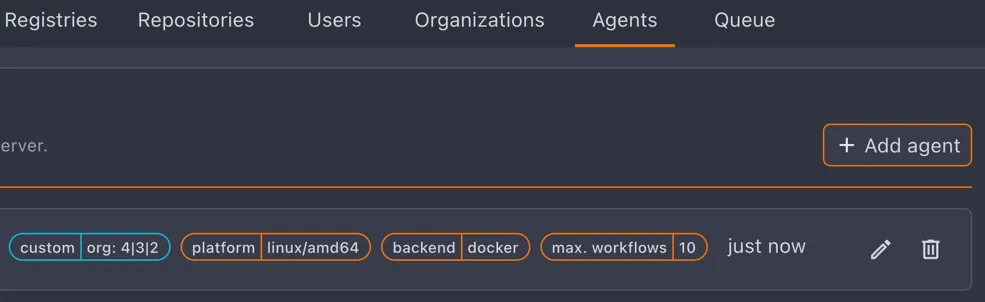
Agent Scope
Section titled “Agent Scope”Admins choose an agent’s scope in the Add agent dialog. Global (the default) lets the agent run pipelines for any organization. Specific organizations scopes the agent to one or more selected orgs.
Org admins can manage agents scoped to their organization from the org’s agent settings page. Deleting a multi-org agent there removes it from that organization only; it is fully deleted when that was its last remaining organization.
Reported Host Resources
Section titled “Reported Host Resources”Agents report the CPU core count and total memory of the machine that runs their workloads.
The agent list and the agent detail page show these totals next to the per-workflow limits, so a limit like 4 GB / 64 GB reads as “4 GB per workflow on a 64 GB host”.
The numbers describe the workload host, not the agent process. An agent that drives a remote Docker daemon reports the daemon’s machine.
| Backend | Reported |
|---|---|
| docker | cores and memory of the Docker daemon host |
| podman | cores and memory of the Podman host |
| local | cores everywhere, memory on Linux only |
| kubernetes | nothing, since workloads are spread across nodes |
Values are read once when the agent starts and refreshed whenever it re-registers. Agents older than the server simply report nothing, and the totals stay hidden for them.
Sharing a Host Between Agents
Section titled “Sharing a Host Between Agents”Several agents on one machine each run up to CROW_MAX_WORKFLOWS workflows, and nothing stops their workflows from adding up until the host runs out of memory.
A host file sets one memory and CPU budget for the whole machine.
The agents on that machine share it: an agent may use all of its slots while the others are idle, but together they never reserve more than the budget, and further workflows wait in the queue.
The Host File
Section titled “The Host File”The host admin writes the file once per machine, at a fixed path that only root (or Administrators on Windows) can change:
/etc/crow-host.yamlon Linux and macOSC:\ProgramData\crow\host.yamlon Windows, in a directory only Administrators can write to
The file sits directly in /etc on purpose: agents keep their own state in /etc/crow, which is often writable by them or mounted into their container, and whoever can write to a directory can replace the files in it.
mem accepts the same units as CROW_BACKEND_DOCKER_LIMIT_MEM, and cpus may be fractional.
A file must set at least one of them; a resource left out is unlimited.
Unknown keys are rejected, so a typo cannot silently drop a limit.
Agents that run in a container read the host’s file, not one inside their container, and need no mount for it.
The Docker and Podman backends ask the engine for the file: they create, but never start, a container from an empty crow-host-probe:1 image with the file’s directory mounted read-only, copy the file out and remove the container.
This also means an agent that talks to a remote Docker daemon or Podman service reads the file of the machine running its workloads.
The local, Tart and Hyper-V backends read the file directly, so run those agents natively, or mount /etc/crow-host.yaml and /etc/machine-id read-only into their container.
Agents read the machine id (/etc/machine-id) the same way.
It defaults the id, and together with the id it identifies the group, so copies of one host file on several machines still give each machine its own budget.
Set an id when the machine has no machine id, such as macOS and Windows.
Agents of Several Crow Servers
Section titled “Agents of Several Crow Servers”The budget covers every agent on the machine, also agents connected to different Crow servers. A server only knows its own agents, so the agents share what they run through the usage ledger, a directory on the host:
- Every agent with a host file keeps one entry there with the workflows it runs and what they reserve, and rewrites it every minute so entries of agents that died go stale after three minutes.
- Agents report the entries of the other agents in their group to their server, which counts the workflows of other servers against the budget.
- Before an agent starts a workflow, it books it in the ledger and reads everyone’s entries. When the host is over its budget, it gives the room back and holds the workflow, renewing its lease, until there is room. Two servers handing out work for the last room at the same moment therefore cannot both start it.
A held workflow stays pending in the UI and can be canceled; its timeout only starts once it runs.
The directory defaults to /var/lib/crow-host-ledger on Linux, /var/db/crow-host-ledger on macOS and C:\ProgramData\crow\ledger on Windows; ledger in the host file changes it.
The host admin creates it once.
Docker and Podman agents reach it through the engine as root, like the host file, using one never-started container per directory that all agents on the engine share, so a root-only directory is enough for them:
Agents running natively as another user (local, Tart) need write access through a group; the sticky bit keeps them from changing each other’s entries:
Do not make the directory writable by everyone: anyone who can write to it can add entries that make the host look full. Agents only read plain files from it and cap each entry at the budget, so made-up entries can hold workflows back but cannot exceed the budget. Without the directory, agents log a warning and each server only keeps its own agents within the budget.
Reload Without Restarts
Section titled “Reload Without Restarts”Agents re-read the host file every 30 seconds, and immediately on SIGHUP (systemctl reload crow-agent, or docker kill --signal HUP <agent>).
The new budget reaches the server with the next health report, so changing it never restarts an agent or interrupts a workflow.
Lowering the budget below what is running kills nothing: new workflows wait until enough of the running ones finish.
A file that cannot be read or parsed is logged and ignored, and the agent keeps the last good budget.
Removing the file takes the agents out of the group.
What One Workflow Reserves
Section titled “What One Workflow Reserves”Each agent declares what one of its workflows reserves from the budget:
They default to the backend’s per-container limits on Docker (CROW_BACKEND_DOCKER_LIMIT_MEM, CROW_BACKEND_DOCKER_LIMIT_CPU_QUOTA) and to the VM size on Tart and Hyper-V.
An agent on a host whose file limits a resource refuses to start without a reservation for it, since its workflows could not be accounted for.
Changing the reservation means restarting the agent; a remote restart waits until the agent runs no workflow.
The Docker limits apply to each container, and a workflow running services or parallel steps runs several containers at once.
Set CROW_WORKFLOW_MEM to what the largest workflow uses in total, not to the per-container limit.
A workflow that reserves more than the whole budget only runs while nothing else runs on the host.
No Opting Out
Section titled “No Opting Out”An agent cannot leave the budget of a host that has a host file:
- Missing workflow size: an agent refuses to start when the file limits a resource it reserves nothing from.
- Unreadable file: an agent refuses to start when it cannot read or parse the file, rather than running without it. Later read errors keep the last good budget.
- Another owner: when global agents, which only admins create, share a host budget, an organization’s agent on that machine joins the same group, so registering an agent with an organization token does not escape it.
- Not seeing the file: agents report their machine id even without a host file. An agent that reports none while a global agent or an agent of the same owner on its machine reports a group does not see the file. It gets no work until it does, and what it already runs counts against the group at the group’s largest reservation. The agent page shows a warning for it.
- Old agents: agents older than this feature report no machine at all, so the server cannot tell where they run. While host groups are in use, the agent page flags them, and they keep running without limits until updated.
The server can only spot an agent that does not see the file once another agent on the machine does, so start the agents that see the file first.
Agents report their host capacity themselves, so the server limits whom a report can affect. Only global agents set the budget of a group that spans owners; an organization’s agent in it shares the budget but cannot change it, and each of its workflows counts as at least the largest reservation the global agents report. A group that only organization agents report binds agents with the same owner and the same organizations alone, so one organization cannot throttle or hold back another’s agents by claiming their machine.
How the Server Schedules
Section titled “How the Server Schedules”The server sums the reservations of the workflows running on each group and only hands a task to an agent whose workflow still fits. When agents report different budgets for one group, for example while one has not re-read an edited file yet, the smallest one applies.
With the least-loaded and pack strategies, agents in groups are compared by how full their hosts are before their own slots, so work spreads across hosts rather than across agents.
Small workflows may start ahead of a larger one that does not fit yet. Once a task has waited five minutes for room, its hosts take no other task until it fits, so large workflows cannot starve.
With several server instances, each recounts the host from the database right after assigning a task and takes the assignment back before delivering it when another server filled the host in the meantime.
Each agent card in the agent list shows its host group with how much of the memory and CPU budget the running workflows reserve, counted the way the scheduler counts them, including workflows of other Crow servers’ agents.
A bar turns red when the host is over budget, which happens when an admin lowers the budget below what already runs.
The agent detail page adds the group’s budget and the agent’s own reservation.
The API returns the same numbers in the host field of each agent.
Once an agent shares a host, the agent list offers Group by host: each host gets a header with its slots, memory and CPU in use, followed by its agents, and agents in no group come last under “Not sharing a host”.
The grouped view lists every agent at once rather than page by page, so a host’s agents are never split, and the browser remembers the choice.
Hosts start folded, showing each agent’s status and name; the browser remembers which hosts you open, and searching or filtering opens them all.
A host is named after the id in its host file.
When the file sets no id, the name is the host’s hostname as the agents’ backend sees it: the Docker or Podman daemon’s host rather than the agent’s container, and the machine itself for the local, Tart and Hyper-V backends.
Agents older than that only report their own hostname (CROW_HOSTNAME, by default the hostname the agent sees), which names the host when they all report the same one; Docker containers’ generated hostnames are skipped.
Otherwise the host shows as “Unnamed host”, so set an id to name it.
It is served by GET /api/v1/agents/hosts, which takes the same search, platform, backend and sort parameters as the agent list.
Enforcing the Budget
Section titled “Enforcing the Budget”The budget decides what the server schedules; on its own it does not stop a workflow from using more than it reserved.
| Backend | Enforcement |
|---|---|
| Tart, Hyper-V | each workflow runs in a VM of fixed size |
| Docker | per-container limits, plus the cgroup-parent slice for the host as a whole |
| Podman | per-container limits, plus the cgroup-parent slice for the host as a whole |
| Local | none |
With cgroup-parent, the kernel caps all workflow containers on the host together, so a workflow exceeding its reservation is OOM-killed inside the slice instead of taking the host down.
Create the slice once, for example as /etc/systemd/system/crow.slice:
This needs Docker or Podman with the systemd cgroup driver.
Version Compatibility
Section titled “Version Compatibility”Agents and the server do not need to run the same Crow version. Each side reports the protocol version it was built with and the oldest version it still accepts, and the agent connects whenever both fall within range. Fields that only one side knows are ignored, so features added in a newer release stay inactive until both sides support them.
The agent refuses to start and logs which side to update when:
- the server requires a newer agent protocol than the agent speaks
- the agent requires a newer server protocol than the server speaks
The server only raises its minimum agent protocol for changes that older agents cannot read, so most server upgrades leave existing agents working. Agents released before Crow 6.12 still check for an exact protocol match, and the server keeps reporting the version they expect.
The agent list and the agent detail page mark each agent next to its version:
| Marker | Meaning |
|---|---|
| red warning | Incompatible: the agent speaks a protocol older than the server accepts and cannot reconnect |
| yellow warning | Outdated: the agent works, but features added in newer protocols stay unavailable until update |
| grey info | A different Crow release than the server on a protocol with nothing missing |
The detail page also shows the agent’s protocol version. Agents report it when they register, so an agent that has not restarted since the server upgrade only shows the release comparison.
Remote Restarts
Section titled “Remote Restarts”Admins can ask an agent to restart onto a newer release from its detail page with Restart to update.
The agent operator has to allow this by setting CROW_AGENT_REMOTE_UPDATE=restart on the agent, and the button stays disabled for agents that have not.
The server never sends the agent code or an image reference: the agent only finishes its work and exits, and its supervisor decides what to start next.
After a request, the agent:
- stops receiving new workflows from the server
- finishes the workflows it is running
- exits with a non-zero status, so any restart policy starts it again, including
on-failure
The request is cleared when the agent registers again, and it can be withdrawn from the detail page until then.
The restart only lands on a newer release when the supervisor pulls one:
| Supervisor | Requirement |
|---|---|
| Kubernetes | a moving tag such as :v7 and imagePullPolicy: Always, so the restarted container pulls the image again |
| systemd | Restart=always or Restart=on-failure, plus an ExecStartPre= step that downloads the new binary |
| Autoscaler | nothing: the autoscaler replaces agents that exit |
| Docker | a restart: policy alone is not enough, since Docker restarts the same container from the image it was created from |
For Docker, the restart only helps together with something that recreates the container from a freshly pulled image, such as a wrapper that runs docker compose pull && docker compose up when the agent exits.
With a pinned tag the agent comes back on the same release, and the outdated marker in the agent list stays.
Rolling Restarts
Section titled “Rolling Restarts”There are two ways to restart many agents without clicking through each one:
- Restart outdated agents on the agent list queues every agent that accepts restart requests and runs a release other than the server’s.
CROW_AGENT_AUTO_RESTARTon the server restarts such agents without anyone asking.
| Policy | Restarts |
|---|---|
off | only agents an admin asked or queued (default) |
outdated | also agents on an older protocol version than the server |
release | also agents on any release other than the server’s, even on the same protocol |
Both respect CROW_AGENT_AUTO_RESTART_MAX_PARALLEL (default 1), the number of agents that may drain at the same time.
The remaining agents keep taking workflows until a slot frees up, so the instance does not lose all of its capacity at once.
An agent that stops reporting while draining frees its slot after two minutes.
Queued agents go first, and a queued restart can be withdrawn from the agent’s detail page like a requested one.
The automatic policy asks each agent at most once per server release. An agent whose supervisor brings back the same old release keeps running with its outdated marker instead of restarting in a loop, and is asked again after the next server upgrade.
Automatic restarts only reach agents that can still connect.
An agent below the server’s minimum protocol version is rejected on registration and never receives a request, which makes outdated worth enabling: it updates agents before a later server release stops accepting them.
In a High Availability deployment, only the server instance holding the leader lock rolls out restarts, so the limit holds across all instances.
Backend Options
Section titled “Backend Options”Configure backend-specific settings at the agent level. See environment variables for all CROW_BACKEND_* options.
Local Backend Sandboxing
Section titled “Local Backend Sandboxing”Enable process isolation using macOS sandbox-exec:
| Level | Network | System Access | Use Case |
|---|---|---|---|
none | ✅ Full | ✅ Full | Trusted code only |
standard | ✅ Full | ⚠️ Limited | Most CI/CD workloads |
strict | ❌ Blocked | ❌ Minimal | Offline builds, maximum isolation |
Standard level details:
| Allows | Denies |
|---|---|
| Network access (npm, go get, pip) | Another workflow’s directories on the same agent |
| System libraries and frameworks | Writing anywhere outside the allowed directories |
The workflow’s own directories, including $TMPDIR | Sensitive user dirs (Documents, Desktop) |
| Shared build caches and the account’s temp dir | SSH private keys |
| Shell configs (.bashrc, .zshrc) | The agent’s own environment and credentials |
none runs processes without isolation. Only use with fully trusted code.